There Alpha 2.5.25887 Ready for Testing on macOS
Welcome to the 17th Version of the There Alpha!
Since this is an Alpha test there will very likely be bugs, in fact, it may not work at all!
Please, please, if you get a crash, please send us your There.log. Right now, the MacOS version isn’t cool enough to automatically send us the logs.
Here are the instructions:
Sorry it’s been a while since the last release. We turned on Shoutcast support and that took a bit longer than anticipated.
- ShoutCast / Music Boxes / BoomBoxes / etc support turned on!
We’re excited to announce we’ve got Shoutcast support working for MacOS!
By default, when you start up, “Music Playing” is OFF, and you will have to turn it on to hear music.
We set it this way so that if it turns out to be crashy, you won’t end up in a situation when you log on and immediately crash because you’re next to a Music Box.
We don’t support “3D” sound yet, but we do support stereo.
Please try it out and let us know how it works for you!
- Fixed a nasty bug which made action tags either not work, or work unpredictably when you clicked them. This occurred when there was a There Edge component like the shortcut bar, IM Window, etc., on the screen.
- Improved (or, tried to improve) handling with Action Mode enable. This should help your paintball skillzzzz!
Thank you for your participation! We value your time and efforts.
To test this app, open TestFlight on your Mac running macOS 14.0 or later and install the update.
There.com for macOS Alpha Test Open for All

Exciting news! There.com has opened the Alpha macOS testing for all users to explore. Please note, we are still in the Alpha test phase so the platform will have many, many bugs and may not work at all. If you have an Apple computer and are running macOS 14 Sonoma you are eligible to help test the Mac version of the virtual world There.com.
Download the Apple TestFlight app in order to access the Alpha client and to provide feedback. Please make sure to use the Apple feedback mechanisms to report crashes and send feedback.
You can access the MacOS Alpha version of There.com here: https://testflight.apple.com/join/sVKtMtCG
During testing if you do crash, you’ll need to email your There.log to Staff at feedback@thereinc.com separately outside of the TestFlight app. Right now, the macOS version is not cool enough to automatically send crash reports. Make sure to include the subject line macOS Crash Report and provide your username in the email. Remember to attach the There.log to your email.
Your There.log is stored in a sandbox. The file can be added to your email as an attachment.
Go to Finder and click on the GO menu item and choose Go to Folder. You can also type Command+Shift+G.
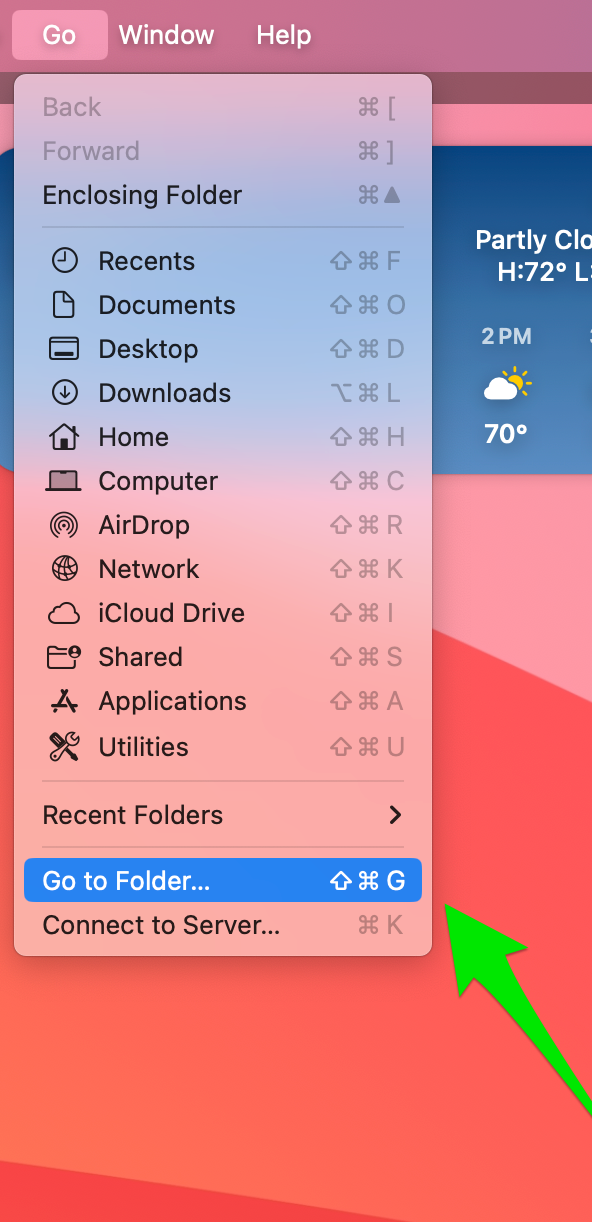
Next, you’ll see a dialog box where you can fill in the folder name. It may already be filled in for you. The sandbox folder name is /Users/username/Library/Containers/com.there.therealpha/. Username will be your Avatar’s name. You can locate There data in the sandbox’s Data/Makena folder.
/Users/username/Library/Containers/com.there.therealpha/Data/Makena
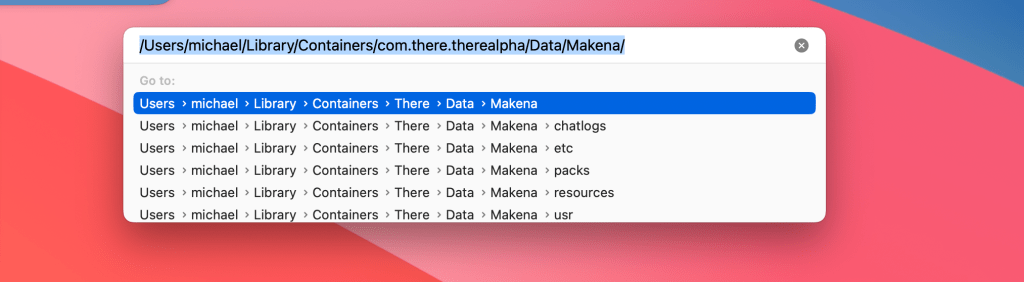
Once you’ve typed in the folder name hit return and the finder should display the Makena folder.
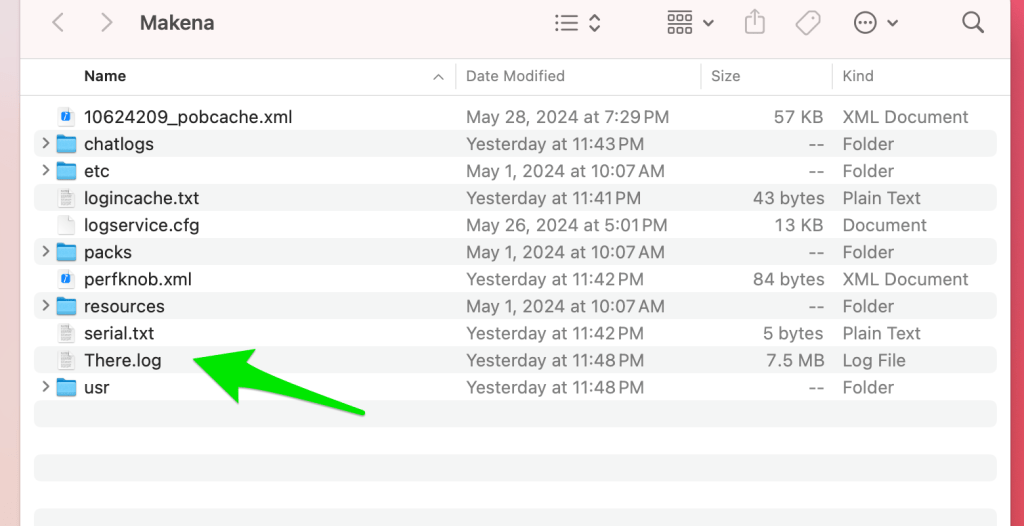
The Makena folder has “There.log” in it along with a folder for your chat logs. Make sure to attach the There.log to your email.
You will need to have a Premium Membership in There.com to test Voice and all of the other perks that come with a Premium account. Upgrade your There Membership here.
The CEO of There, Mr. Wilson will be communicating to all Alpha testers through his personal blog I Am So There. You will want to subscribe to the blog to receive update notifications.
Mr. Wilson has posted Tips and Tools for the There OSX Alpha Test which provides instructions to testers for the next steps.
Thank you for volunteering to be a There.com virtual world Alpha Mac Tester. We value your time and greatly appreciate your efforts. See you There!
 There Blog