
Exciting news! There.com has opened the Alpha macOS testing for all users to explore. Please note, we are still in the Alpha test phase so the platform will have many, many bugs and may not work at all. If you have an Apple computer and are running macOS 14 Sonoma you are eligible to help test the Mac version of the virtual world There.com.
Download the Apple TestFlight app in order to access the Alpha client and to provide feedback. Please make sure to use the Apple feedback mechanisms to report crashes and send feedback.
You can access the MacOS Alpha version of There.com here: https://testflight.apple.com/join/sVKtMtCG
During testing if you do crash, you’ll need to email your There.log to Staff at feedback@thereinc.com separately outside of the TestFlight app. Right now, the macOS version is not cool enough to automatically send crash reports. Make sure to include the subject line macOS Crash Report and provide your username in the email. Remember to attach the There.log to your email.
Your There.log is stored in a sandbox. The file can be added to your email as an attachment.
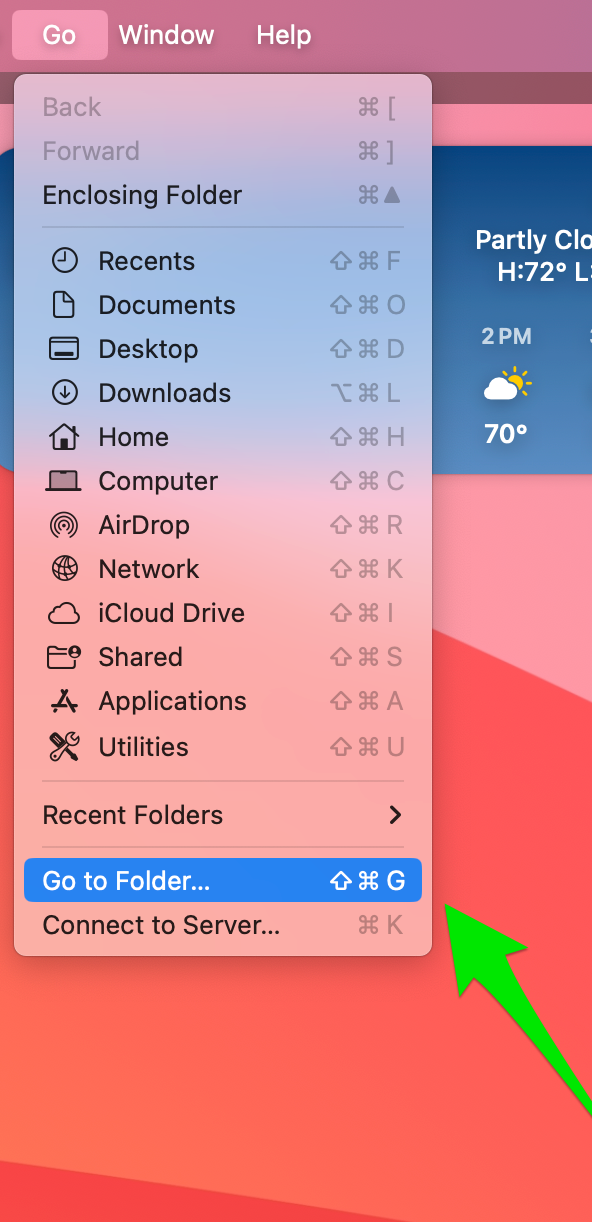
Go to Finder and click on the GO menu item and choose Go to Folder. You can also type Command+Shift+G.
Next, you’ll see a dialog box where you can fill in the folder name. It may already be filled in for you. The sandbox folder name is /Users/username/Library/Containers/com.there.therealpha/. Username will be your Avatar’s name. You can locate There data in the sandbox’s Data/Makena folder.
/Users/username/Library/Containers/com.there.therealpha/Data/Makena
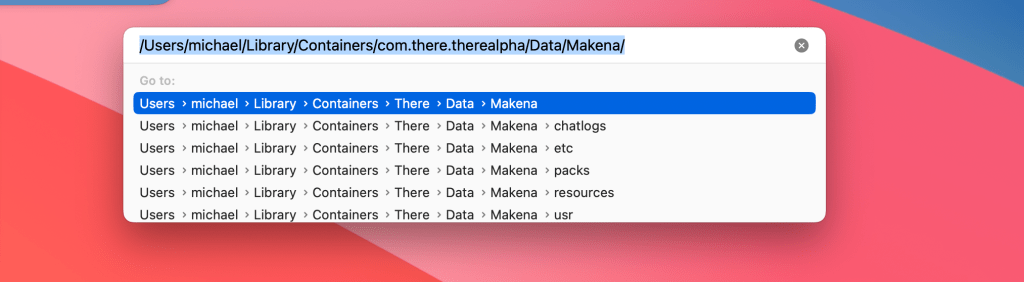
Once you’ve typed in the folder name hit return and the finder should display the Makena folder.
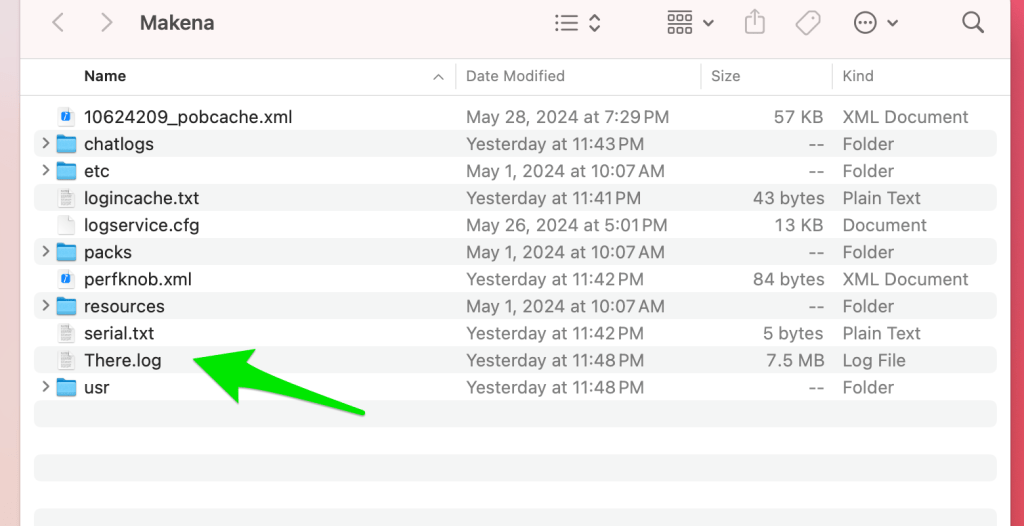
The Makena folder has “There.log” in it along with a folder for your chat logs. Make sure to attach the There.log to your email.
You will need to have a Premium Membership in There.com to test Voice and all of the other perks that come with a Premium account. Upgrade your There Membership here.
The CEO of There, Mr. Wilson will be communicating to all Alpha testers through his personal blog I Am So There. You will want to subscribe to the blog to receive update notifications.
Mr. Wilson has posted Tips and Tools for the There OSX Alpha Test which provides instructions to testers for the next steps.
Thank you for volunteering to be a There.com virtual world Alpha Mac Tester. We value your time and greatly appreciate your efforts. See you There!
 There Blog
Hi, I have a Mac with Sequoia 15.3.2 so I’m assuming since I don’t have Sonoma 14 I’m unable to use There? Is there any chance of testing for other macOS’ in the near future? Thanks!
LikeLike
wow, i really didnt expect any recent comments here lol, uhm, i have the same problem because i installed testflight and did it all step by step but it just seems like we gotta change computers to use there haha
LikeLiked by 1 person
Please contact Feedback@therienc.com and state which client Mac or PC that you are having issues with and someone will be able to help you.
LikeLiked by 1 person
‘wave Hello Punkster. We hope you are able to come back and list some of your designs. Right now Sonoma is the only version we are testing in the Mac Alpha client.
LikeLiked by 1 person
Oh! Okay thank you for answering my question! I have the latest OS. Brand new MacBook Air with M3 chip. Hopefully we’ll have it working for the latest OS in the future. I would love to be back to list and host events. Working on saving to build a gaming/developing desktop pc. Until then! ‘Wave
LikeLike
Tested on mac book pro m3 everything works except certain camera angles when sitting on things. test on the newest Sequoia Os
LikeLike
Thanks for using the Mac Alpha Test Client! Please direct all feedback through the TestFlight app.
LikeLike
Just updating that I too am on the latest macOS with the M3 and all is well. MacBook Air here. No issues so far but will screenshot and report if I have any. Great to see the world and hear the those familiar sounds again!
LikeLike
[…] on an iPad or mobile device. There is not available on any game streaming service. We do have an Alpha Mac Test Client if you want to help us test a Mac version of There. You can also use There IM to chat with your […]
LikeLike
[…] virtual world for the Mac computer so it is super buggy and sometimes might not even work. Read the There Mac Alpha Test Client blog post for information on how to download the Mac client and where to post your tester feedback […]
LikeLike
[…] software to your PC computer. If you want to help test a Mac version of the virtual world, read the There Alpha Mac Test Client blog post for instructions and where to post feedback. At this time, the virtual world game There […]
LikeLike
Hi there, I was wondering if you are planning to ever expand to mac with Sequoia in the near future, I understand as of now it is just exclusive to sonoma.
LikeLike
Hello, at this time we are only running on Sonoma.
LikeLike
Is There thinking about creating a macOS version of Previewer and Stylemaker for creators?
LikeLike